
LRS Test Drive
Build it. Drive it. Return it.
A complete standalone-first Test Drive system with an in-game location builder, searchable vehicle catalog, timed drives, optional deposits and GPS-guided returns.
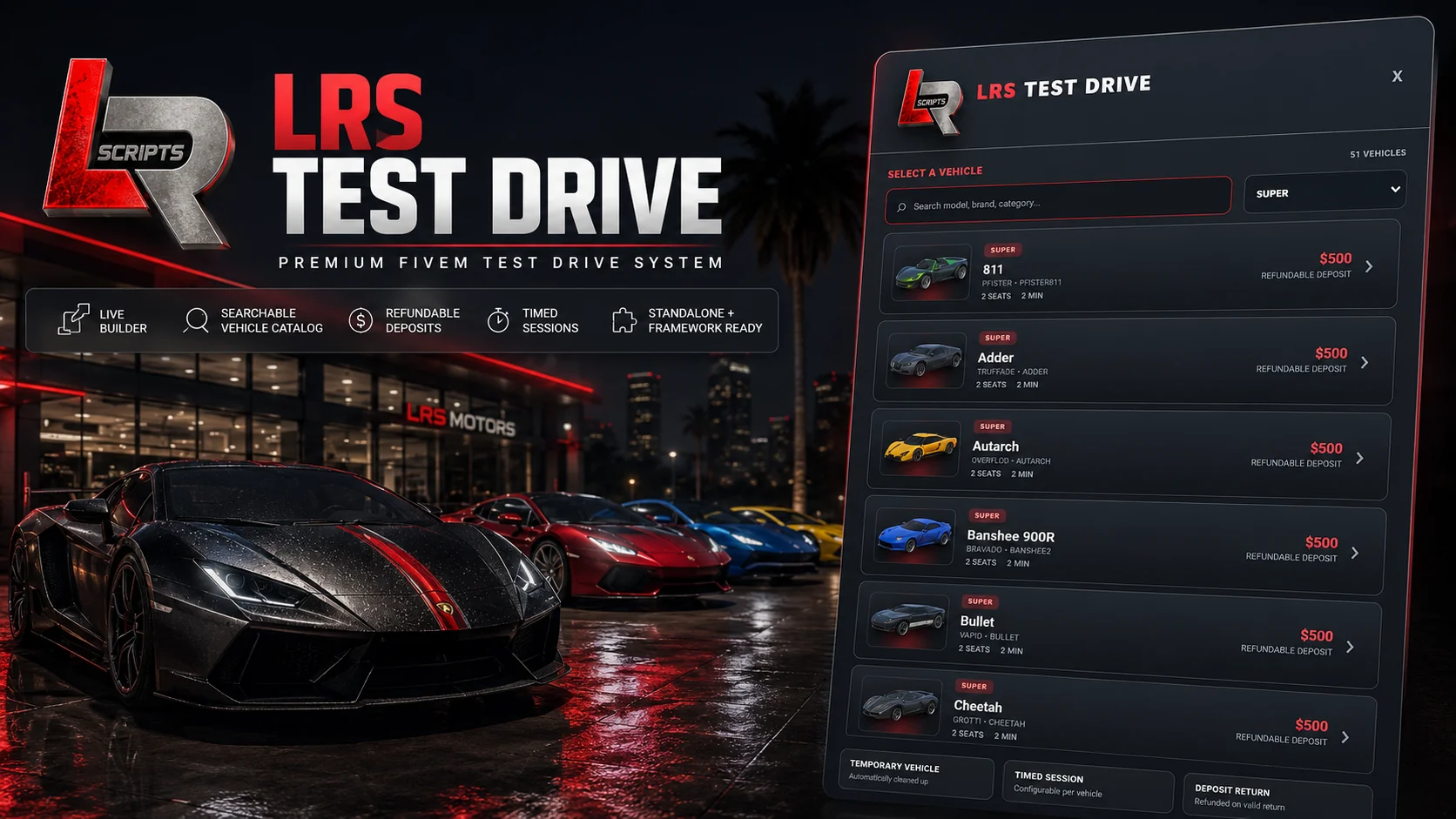
Build Test Drive locations in-game
LRS Test Drive removes the need to manually copy and configure Test Drive coordinates. Authorized administrators can open /testdrivebuilder, name a location, assign a unique key, select an attendant and scenario, then ghost-place the Test Drive Attendant, Vehicle Spawn and Return Zone directly in the world.
Saved locations update in real time without a server restart. Players approach the attendant, browse a searchable vehicle catalog with images, categories, vehicle details, drive duration and optional refundable deposits, then begin a timed session. Optional GPS guidance leads back to the saved Return Zone, where the temporary vehicle is cleaned up and a valid refundable deposit can be returned.
Complete standalone-first release
lrscripts.testdrive.builder.Test Drive Builder workflow
The builder creates a complete customer-facing Test Drive Location without requiring manual coordinate entry.
1. Run /testdrivebuilder
2. Enter the Test Drive name
3. Enter a unique location key
4. Search and select the Test Drive Attendant
5. Choose the ped scenario
6. Ghost-place the attendant
7. Ghost-place the Vehicle Spawn
8. Ghost-place the Return Zone
9. Enable the optional Test Drive map blip
10. Choose the Vehicle Set
11. Save
12. Exit the builder
13. The location becomes available in real time
Vehicle catalogs & images
LRS Test Drive can use the QBCore shared vehicle catalog where available, the Qbox vehicle catalog, supported ESX/custom bridge or configuration integrations, standalone config-defined vehicle lists and extra config-defined vehicles. This does not claim that ESX provides a native QBCore-style shared vehicle table.
Deposits, GPS & session safety
Notifications & accessibility
LRS Notify is optional and is never listed as a required dependency. Notification priority is:
1. LRS Notify
2. ox_lib
3. Qbox / QBCore / ESX
4. Config.CustomBridge.Notify
5. Native FiveM
See LRS Test Drive in action
Watch the official v1.4.4 gameplay showcase using the site’s click-to-load YouTube player.
Compatibility
The complete core Test Drive system operates standalone. Optional framework integrations can provide economy or vehicle-catalog functionality where configured.
Commands & Builder ACE
/testdriveOpen the nearest Test Drive vehicle interface./testdrivebuilderOpen the ACE-protected Test Drive Location builder./returntestdriveReturn the active Test Drive vehicle while inside the configured Return Zone./endtestdriveEnd the active Test Drive early.add_ace group.admin lrscripts.testdrive.builder allow
Installation
1. Obtain LRS Test Drive through the official LRSCRIPTS Tebex package
2. Place lrs_test_drive in the server resources folder
3. Review config.lua
4. Configure optional framework, economy and notification integrations
5. Add the Builder ACE for authorized administrators
6. Start optional integrations before Test Drive where applicable
7. Add ensure lrs_test_drive to server.cfg
8. Restart the resource or server
9. Run /testdrivebuilder
10. Create the first Test Drive Location
add_ace group.admin lrscripts.testdrive.builder allow

ensure lrs_test_drive
dealers.json. Do not delete or overwrite it. The server creates this runtime data file automatically after the first successful builder save. Older installations may require preserving or migrating data/dealers.json according to the release documentation.Configuration & customer control
Customer-editable configuration covers the framework and notification providers, standalone settings and deposits, deposit/refund behavior, drive duration, Return Zone radius, Vehicle Spawn clearance, return GPS, vehicle catalog source, extra and excluded vehicles, excluded categories, allowed vehicle types, image providers and local image overrides.
Server owners can also configure vehicle-key integrations, Builder ACE permission, ped presets and scenarios, map blip defaults, placement distance, ghost alpha, normal and fine rotation steps, plus CustomBridge.GetVehicles, CustomBridge.RemoveMoney, CustomBridge.AddMoney and CustomBridge.Notify.
Core Lua logic uses Cfx.re Asset Escrow. Intended configuration, locales and runtime builder data remain editable. Free means $0; it does not mean open source or grant redistribution rights.
Build Notes · v1.4.4
Support
When requesting help, include the LRS Test Drive version, framework/provider, vehicle model, Test Drive Location, relevant configuration choice, first relevant client F8 error and first relevant server-console error.
Support Guide